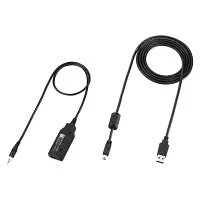
ICOM OPC-478UD USB Cloning Cable for Radio Programming Data Transfer
Product Description
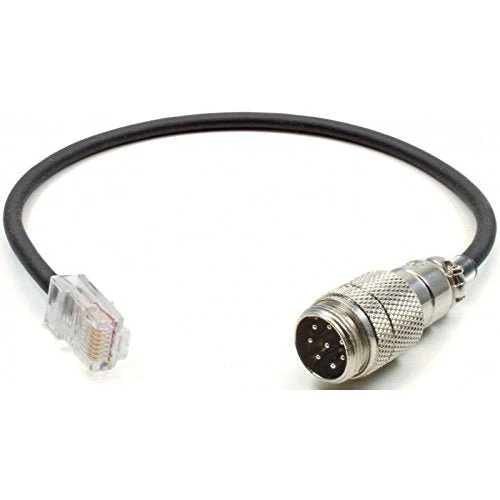
This programming cable is designed to connect wireless transceivers or amateur radio devices to a PC, enabling easy programming and configuration. It is compatible with a wide range of transceivers and receivers, including both current and discontinued models. The cable features a USB connector on one end and a 3.5mm stereo plug on the other, ensuring straightforward connectivity between your device and computer for firmware updates, settings adjustments, and data management.
Product Specification
Cable Length: 52 cm
Connector Type: USB to 3.5mm stereo plug
Compatible Devices
This programming cable supports the following devices:
- IP Transceivers: IP510H, IP502H (discontinued), IP501H (discontinued), IP500H (discontinued)
- Wi-Fi Transceivers and Controllers: IP100H, IP100FS, IP1000C
- Amateur Radio Equipment:
- ID-5100 (144/430MHz Dual Band Digital 20W Transceiver with GPS)
- ID-4100 (144/430MHz Dual Band Digital 20W Transceiver with GPS)
- IC-2730 (144/430MHz Dual Band FM 20W Transceiver)
- IC-P7 (discontinued, 144/430MHz Dual Band FM Transceiver)
- IC-T70/IC-S70 (discontinued, 144/430MHz Dual Band FM Transceiver)
- ID-800 (discontinued, 144/430MHz Dual Band 20W Transceiver)
- ID-80 (discontinued, 144/430MHz Dual Band Digital Transceiver with Wideband Receiver and GPS Mic Support)
- IC-2820G (discontinued, 144/430MHz Dual Band Digital 20W Transceiver)
- ID-880 (discontinued, 144/430MHz Dual Band Digital Transceiver with Wideband Receiver)
- IC-T10/IC-S10 (144/430MHz Dual Band 5W FM Transceiver)
- Receivers:
- IC-R6 (Wideband Handy Receiver)
- IC-R3ss (discontinued, Wideband Handy Receiver)
- IC-R5 (discontinued, Wideband Handy Receiver)
Usage
To use the programming cable, simply connect the USB end to your PC and the 3.5mm stereo plug to the compatible transceiver or receiver. This allows you to perform programming tasks, update firmware, and manage device settings through the appropriate software. For firmware and driver downloads, please refer to the manufacturer's official support website.
Description
Product Description
This programming cable is designed to connect wireless transceivers or amateur radio devices to a PC, enabling easy programming and configuration. It is compatible with a wide range of transceivers and receivers, including both current and discontinued models. The cable features a USB connector on one end and a 3.5mm stereo plug on the other, ensuring straightforward connectivity between your device and computer for firmware updates, settings adjustments, and data management.
Product Specification
Cable Length: 52 cm
Connector Type: USB to 3.5mm stereo plug
Compatible Devices
This programming cable supports the following devices:
- IP Transceivers: IP510H, IP502H (discontinued), IP501H (discontinued), IP500H (discontinued)
- Wi-Fi Transceivers and Controllers: IP100H, IP100FS, IP1000C
- Amateur Radio Equipment:
- ID-5100 (144/430MHz Dual Band Digital 20W Transceiver with GPS)
- ID-4100 (144/430MHz Dual Band Digital 20W Transceiver with GPS)
- IC-2730 (144/430MHz Dual Band FM 20W Transceiver)
- IC-P7 (discontinued, 144/430MHz Dual Band FM Transceiver)
- IC-T70/IC-S70 (discontinued, 144/430MHz Dual Band FM Transceiver)
- ID-800 (discontinued, 144/430MHz Dual Band 20W Transceiver)
- ID-80 (discontinued, 144/430MHz Dual Band Digital Transceiver with Wideband Receiver and GPS Mic Support)
- IC-2820G (discontinued, 144/430MHz Dual Band Digital 20W Transceiver)
- ID-880 (discontinued, 144/430MHz Dual Band Digital Transceiver with Wideband Receiver)
- IC-T10/IC-S10 (144/430MHz Dual Band 5W FM Transceiver)
- Receivers:
- IC-R6 (Wideband Handy Receiver)
- IC-R3ss (discontinued, Wideband Handy Receiver)
- IC-R5 (discontinued, Wideband Handy Receiver)
Usage
To use the programming cable, simply connect the USB end to your PC and the 3.5mm stereo plug to the compatible transceiver or receiver. This allows you to perform programming tasks, update firmware, and manage device settings through the appropriate software. For firmware and driver downloads, please refer to the manufacturer's official support website.